In the world of cybersecurity and penetration testing, Kali Linux stands out as a leading operating system. Designed for advanced security testing, Kali Linux offers a comprehensive suite of tools that are indispensable for professionals in the field. If you’re considering a Kali Linux download, it’s essential to understand the features that make it unique and how to get started with the installation process. This article will guide you through everything you need to know about Kali Linux, from its features to the download process.
What is Kali Linux?
Kali Linux is a Debian-based Linux distribution specifically crafted for security professionals and enthusiasts. It is renowned for its vast array of pre-installed security tools, which cater to various aspects of cybersecurity including penetration testing, network analysis, and digital forensics. Developed by Offensive Security, Kali Linux is a continuation of Back Track, a previous penetration testing distribution.
Key Features of Kali Linux
1. Comprehensive Toolset
One of the primary reasons for downloading Kali Linux is its extensive collection of tools. The operating system includes over 600 pre-installed tools that cover a wide range of security tasks. These tools are categorized into various sections such as Information Gathering, Vulnerability Analysis, Wireless Attacks, and Exploitation Tools. Some of the most popular tools include Metasploit Framework, Nmap, Wireshark, and Air crack-ng.
2. Customizable and Flexible
Kali Linux is designed with flexibility in mind. Users can customize their environment to suit their specific needs. Whether you prefer a lightweight installation or a full-featured desktop environment, Kali Linux provides options to tailor the system according to your preferences. This customization ensures that you have a streamlined and efficient workspace for your security assessments.
3. Regular Updates and Support
Kali Linux benefits from regular updates and robust community support. The Offensive Security team actively maintains and updates the distribution to ensure that it stays current with the latest security tools and features. Additionally, the Kali Linux community is vibrant and helpful, offering forums and resources where users can seek assistance and share knowledge.
4. Live Boot and Installation Options
Kali Linux offers various installation options, including a live boot feature. This allows users to run Kali Linux directly from a USB drive without making changes to the host system. The live boot option is particularly useful for conducting security assessments on different machines without altering their configurations. For those who wish to integrate Kali Linux into their primary operating system, a full installation is also available.
5. Multi-Language Support
Understanding that cybersecurity professionals come from diverse linguistic backgrounds, Kali Linux includes multi-language support. This feature ensures that users around the world can operate the system in their native language, making it more accessible and user-friendly.
How to Download Kali Linux
Downloading Kali Linux is straightforward. Follow these steps to get started:
1. Visit the Official Website
Go to the official Kali Linux website at www.kali.org. The website provides the latest version of Kali Linux and all necessary download links.
Step 1: Visit the Official website of Kali Linux then select Download option

Step 2: Select the "Recommended" option.
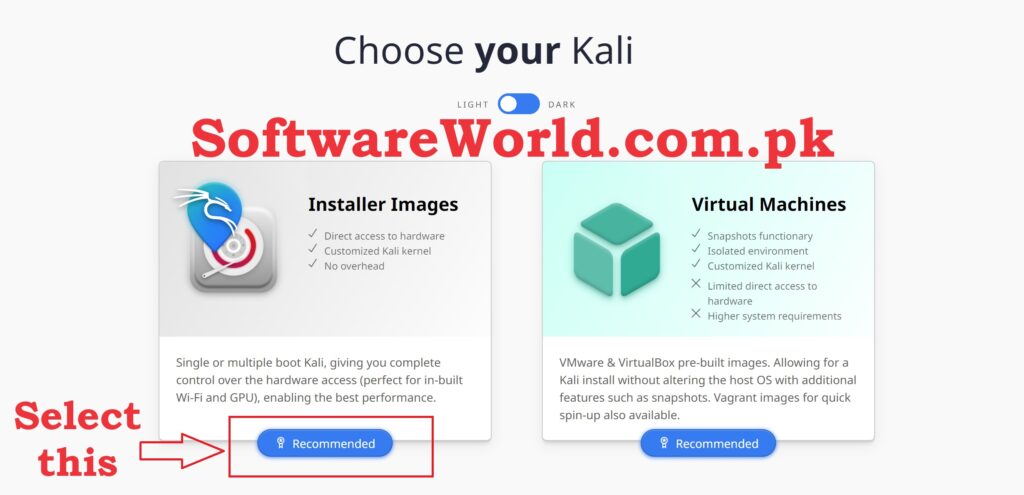
Step 3: Now select the version which one you want x64 or x32 depend on you.
How to Download Kali Linux Quickly from IDM
- Install Application using exe file in Setup folder
- Close the Application completely (Even from system tray and task manager)
- Copy the IDMan.exe file from active folder to Application’s installation folder (C:\Program Files (x86)\Internet Download Manager)
- Confirm replacing if asked
- Run reg file
- Enjoy the Application
Click Here to See Free Windows 11 Download and Its Features
2. Choose the Right Version
Kali Linux offers various versions tailored to different needs. You can select from options like the standard ISO image for a full installation, a lightweight version for older hardware, or virtual machine images for platforms like VMware and VirtualBox. Make sure to choose the version that best suits your requirements.
3. Verify the Download
For security purposes, it’s crucial to verify the integrity of the downloaded image. Kali Linux provides checksums and GPG signatures on their download page. Use these tools to confirm that the file has not been tampered with.
4. Create a Bootable USB Drive
If you plan to use Kali Linux in live mode or perform a fresh installation, you’ll need to create a bootable USB drive. Tools like Rufus or Ballina Etcher can help you burn the Kali Linux ISO image to the USB drive. Follow the instructions provided by these tools for a successful setup.
5. Installation
Boot your computer from the USB drive or ISO image, and follow the on-screen instructions to complete the installation. The process is user-friendly, and the installer will guide you through configuring partitions, setting up user accounts, and finalizing the installation.
Conclusion
Kali Linux is an essential tool for anyone involved in cybersecurity, offering a robust set of features that make security testing and analysis more efficient. By downloading Kali Linux, you gain access to a wealth of powerful tools, regular updates, and a supportive community. Whether you’re a seasoned security professional or just starting out, Kali Linux provides the resources you need to excel in your field.
If You Have Any Questions, Please Feel Free to Post Them in the Comment Section Below!
For more updates and content, be sure to follow our Facebook page, subscribe to our YouTube channel, and check out our Instagram for the latest photos and stories.